Telecommuting is growing in popularity because it is something that just makes sense. Commuting is annoying for workers, bad for the environment and just not necessary now that advanced technology makes remote collaboration easy and affordable for businesses of all sizes. However, as people have started to move their offices to their homes, they've realised the need to create a space for themselves in what was often an already crowded house. This need has sparked a movement towards telecommuting from untraditional parts of the home such as the garden shed.
The garden shed can serve as a way for the telecommuting employee to maintain better boundaries between work and home because it's a separate space away from the rest of the house. It can also be a way to set up an office space that is functional and yet peaceful. One of the greatest benefits of telecommuting is that it reduces car pollution caused by commutes and allows for a greener earth. People who engage in shedworking (the official name for converting garden sheds into office spaces) celebrate that greening of the earth by actually working in places where nature can thrive around them.
Here are twenty of the best examples of garden shed offices being used by people around the world today.
Internal Shed
Internal Shed: For those people who do not have the luxury of garden space and who need something like a garden shed to keep work and home separate, the answer might be the up-and-coming internal shed. This unique design lets you have all of the function of the garden shed office even when you don't have room for a real garden. Hang some plants in the house outside of the office door to enhance the feeling that you're working from outdoors.
Multi-Purpose Office Space
Multi-Purpose Office Space: Your garden shed office doesn't have to be a small space where you lock yourself away from the family to do your work. It's possible to create a multi-purpose garden shed where the kids can play, meals can be cooked and you can get your work done all at the same time. In this case, the garden shed office is just like an extension of the rest of the house so it's great for people who actually operate their own business from home.
Manhattan Rooftop Shed Office
Manhattan Rooftop Shed Office: Now here's a shed that blows up any and all basic presuppositions you may have about shed offices. This Robert Stern creation is the height of shed chic with plenty of space, lots of natural light and clean minimalist style. Rather than tearing down the old metal-clad rooftop shed, Stern converted it into a place where he can retreat to in the midst of Manhattan.
Deck Space
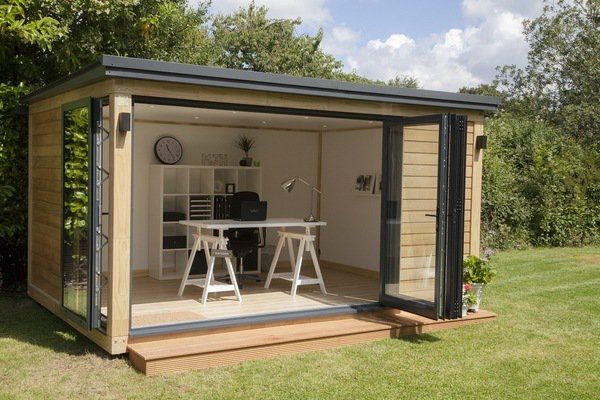
Deck Space: This is a simple shed from the Modern Shed company which makes affordable easy-to-erect sheds that can be used for different functions including office space. Set it up on a large deck and you have an office that's got indoor and outdoor workspace. When you're on the computer, you can hang out inside the shed but when you just have to read documents, you can lounge on the deck.
George Bernard Shaw's Writing Hut
George Bernard Shaw's Writing Hut: The idea of working from the garden shed is not a new one and it's not one that is only done by the 'average Joe'. One of the most well-known garden shed offices is the writing hut that George Bernard Shaw used to create his now-famous works of literary art. Not only is this garden shed office simple and functional but it's also created on a rotating platform so that you can actually move the entire shed around to get the best light at different times throughout the day.
Greenhouse Office
Greenhouse Office: If you're going to get the opportunity to have your office in a lush back garden, why not create a shed design that's going to actually allow you to see that scenery? If you're not just renovating an existing garden shed but rather building a new shed-like office on the property, you can go all out creating a space like this greenhouse office. It's a design that celebrates nature and makes work a lot more relaxing.
Solardome
Solardome: This is a glass dome that you can order and set up to create an eco-friendly home office in your garden. It's not quite a shed but it's certainly an option for the modern person who likes the garden shed office idea but who wants to take things a step further and create an edgier workspace.
The Rustic Look
The Rustic Look: Not everyone is interested in the idea of creating an office space in the most modern garden shed available. Some people prefer the old shed or barn that's got a romantic, historic feeling to it. It's possible to take any structure on your property and convert it into a home office that feels right to you. Chances are that you're going to get your best work done in whatever type of space creates the most comfort.
Log Cabin Office
Log Cabin Office: People who own homes in areas where log cabins are popular might find that the log cabin office shed is the best way to go. This takes a more traditional log cabin shed that was originally designed for storage on the property and converts it into a usable workspace without destroying the streamlined aesthetics of the home's landscape.
Desert Oasis
Desert Oasis: CMDB Architects creates shed offices for people who live in different parts of the world. This one serves the folks who live in the desert and who need protection from the elements that can be overwhelming there. It's intended to be a nomadic option for the modern world so it's easy to set up and take down despite the fact that it looks complex.
Some Real Space
Some Real Space: The average garden shed is obviously small so it works perfectly as the home office for someone in an urban environment who needs to make the most of whatever limited space is available. However, there are people out there who are creating much bigger shed space on larger properties. This writer's studio is 600 square feet in size and is located just a walk away from the main house.
Poolside
Poolside: Imagine leaving the office and heading straight for a dip in the pool. That's possible when you create a Metroshed office on your own property. These eco-friendly sheds are set up in such a way that you can put them anywhere in the garden and use them for your office. Since they're pre-fabricated, they're very easy to install. They're particularly loved by people who want art studios but they'll work for any type of home office.
Roof Garden
Roof Garden: The nature that surrounds the garden shed office does not have to be limited to what can be planted on the ground. This is an example of how the garden shed office can have its own rooftop garden. Taking a 15-minute break to check on the plants that are growing above you has got to be a whole lot healthier than the coffee and cigarette breaks taken by the normal office worker.
Shaded By Trees
Shaded By Trees: This is your basic garden shed that's easy for anyone to create. It's got electricity, wireless internet and everything else that you would need to be able to function in the modern office. And yet it's ensconced within the nature of the trees that line the property. For the person who is just making that first move to greening the earth by engaging in shedworking, this is the ideal option.
Classic Design
Classic Design: The classic design for a garden shed office is to take a wooden garden shed and convert it into something a little bit more aesthetically pleasing. Some curtains on the windows, a fan to keep you cool and a spot outside where you can work on projects when the weather is nice will make you love your garden shed office space.
Trailer Office
Trailer Office: Not everyone actually has a shed in their garden which can be changed into an office. However, most people have something that can be used to create this space. For example, it's possible to take an old trailer and move it into the garden. The trailer will already have a lot of the amenities that you'll need in an office so it's easy to begin telecommuting from this little slice of heaven in your own back yard.
The Magic Cottage
The Magic Cottage: There is an artist in San Francisco named SARK who has long operated out of what she calls her Magic Cottage. She originally moved into the space because she needed an office and San Francisco is short on affordable spaces. However, she's remained in the garden shed office even after gaining success in her field because she really loves the atmosphere and ambience of working from the garden shed. With a tree growing through the wall, beam ceilings, a loft bed for reading and a vine-tangled garden outside, it's certainly an interesting office space.
Shed Expansion
Shed Expansion: Hopefully your home business is going to grow. The bad news will be that your garden shed may have to grow with it. Smart design can add a simple extension to a garden shed office, making it possible to get everything that you need into the office without feeling cluttered (and without spending much money on the renovation). After all, telecommuting is supposed to make you feel less like you're stuck in a cubicle!
Winter Wonderland
Winter Wonderland: You can have a garden shed office no matter what type of weather you live in. You'll just need to make sure to install the right climate control options for keeping the office comfortable during the different seasons. A big window helps you enjoy things like snow without freezing as you work.
A Little Overgrown
A Little Overgrown: The landscaping surrounding the garden shed office doesn't have to be trimmed and polished. Some people work best when there are brambles and messes around them. You should certainly keep the inside of your office neat and clean in order to enhance productivity but if you want to let the outside grow over a little bit then you should feel absolutely free to do so.