- Ink Cartridges
- Epson Ink Cartridges
- Stylus Photo PX650 Ink Cartridges
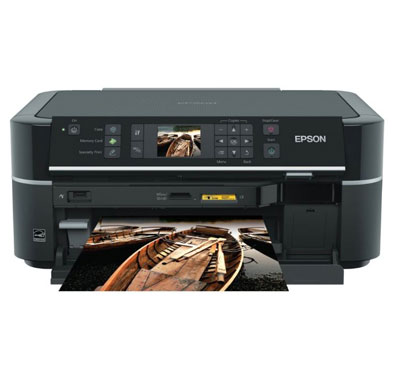
Epson Stylus Photo PX650 Ink Cartridges
The following21 products are guaranteed to work in your Epson Stylus Photo PX650 printer:
21 products
Sets of ink cartridges for Epson Stylus Photo PX650 printer:

- 1x470pages
- 1x1425pages
- 1x660pages
- 1x930pages
- 1x685pages
- 1x714pages
FREE next-day delivery when you order before 5:15pm
- Contains
T0791, T0792, T0793, T0794, T0795, T0796
FREE next-day delivery when you order before 5:15pm

- 1x300pages
- 1x900pages
- 1x345pages
- 1x590pages
- 1x440pages
- 1x460pages
FREE next-day delivery when you order before 5:15pm
Save £27.16 compared to Epson
- Contains
T0801, T0802, T0803, T0804, T0805, T0806
FREE next-day delivery when you order before 5:15pm
Save £27.16 compared to Epson

- 1x300pages
- 1x900pages
- 1x345pages
- 1x590pages
- 1x440pages
- 1x460pages
FREE next-day delivery when you order before 5:15pm
- Contains
T0801, T0802, T0803, T0804, T0805, T0806
- Lowest online price guarantee
FREE next-day delivery when you order before 5:15pm
Black ink cartridges for Epson Stylus Photo PX650 printer:

- 1x470pages
Next-day delivery when you order before 5:15pm
Next-day delivery when you order before 5:15pm

- 1x300pages
Next-day delivery when you order before 5:15pm
Save £4.70 compared to Epson
Next-day delivery when you order before 5:15pm
Save £4.70 compared to Epson

- 1x300pages
Next-day delivery when you order before 5:15pm
- Lowest online price guarantee
Next-day delivery when you order before 5:15pm
Cyan ink cartridges for Epson Stylus Photo PX650 printer:

- 1x1350pages
Next-day delivery when you order before 5:15pm
Next-day delivery when you order before 5:15pm

- 1x900pages
Next-day delivery when you order before 5:15pm
Save £4.92 compared to Epson
Next-day delivery when you order before 5:15pm
Save £4.92 compared to Epson

- 1x900pages
Next-day delivery when you order before 5:15pm
- Lowest online price guarantee
Next-day delivery when you order before 5:15pm
Light cyan ink cartridges for Epson Stylus Photo PX650 printer:

- 1x520pages
Next-day delivery when you order before 5:15pm
Next-day delivery when you order before 5:15pm

- 1x345pages
Next-day delivery when you order before 5:15pm
Save £4.92 compared to Epson
Next-day delivery when you order before 5:15pm
Save £4.92 compared to Epson

- 1x345pages
Next-day delivery when you order before 5:15pm
- Lowest online price guarantee
Next-day delivery when you order before 5:15pm
Magenta ink cartridges for Epson Stylus Photo PX650 printer:

- 1x685pages
Next-day delivery when you order before 5:15pm
Next-day delivery when you order before 5:15pm

- 1x440pages
Next-day delivery when you order before 5:15pm
Save £5.11 compared to Epson
Next-day delivery when you order before 5:15pm
Save £5.11 compared to Epson

- 1x440pages
Next-day delivery when you order before 5:15pm
- Lowest online price guarantee
Next-day delivery when you order before 5:15pm
Light magenta ink cartridges for Epson Stylus Photo PX650 printer:

- 1x590pages
Next-day delivery when you order before 5:15pm
Save £4.92 compared to Epson
Next-day delivery when you order before 5:15pm
Save £4.92 compared to Epson

- 1x685pages
Next-day delivery when you order before 5:15pm
Next-day delivery when you order before 5:15pm

- 1x590pages
Next-day delivery when you order before 5:15pm
- Lowest online price guarantee
Next-day delivery when you order before 5:15pm
Yellow ink cartridges for Epson Stylus Photo PX650 printer:

- 1x975pages
Next-day delivery when you order before 5:15pm
Next-day delivery when you order before 5:15pm

- 1x460pages
Next-day delivery when you order before 5:15pm
Save £5.11 compared to Epson
Next-day delivery when you order before 5:15pm
Save £5.11 compared to Epson

- 1x460pages
Next-day delivery when you order before 5:15pm
- Lowest online price guarantee
Next-day delivery when you order before 5:15pm
If you're in the market for awesome prices for Epson PX650 supplies then take a look at Cartridge Save, the online home of the most reliable and also affordable PX 650 inkjet cartridges here in the UK! You'll find an entire variety of PX-650 printer ink cartridges available to buy, which means that you don't need to spend any of your precious free time contacting high street businesses attempting to find deals like what we have. To find the leading range and the best value deals online, place your order for cartridges now with Cartridge Save!
100% Free delivery on orders over £30 For All Epson PX650 Cartridges which lets you retain every penny of the cash saved resulting from our famous lower rates. In addition to that, everything available from our website is included with our money back assurance and also our no worries cartridge returns policy - if you aren't completely satisfied with your PX650 inks then we won't be either. Spend less, buy now.
What ink does the Epson Stylus Photo PX650 use?
The Epson Stylus Photo PX650 uses Cartridge Save T0791 ink cartridges. Cartridge Save T0791 ink comes in black; the black cartridge prints 470 pages.
Epson Stylus Photo PX650 Printer Review
Expert review of the Epson Stylus Photo PX650 printer
'%20/%3e%3cpath%20d='M%205.454545454545455,0.6060606060606061,1.8181818181818181,12.000000000000002,10.90909090909091,4.7272727272727275,0,4.7272727272727275,9.090909090909092,12.000000000000002z'%20fill='%23d8d8d8'%20transform='translate(24,0)'%20/%3e%3cpath%20d='M%205.454545454545455,0.6060606060606061,1.8181818181818181,12.000000000000002,10.90909090909091,4.7272727272727275,0,4.7272727272727275,9.090909090909092,12.000000000000002z'%20fill='%23d8d8d8'%20transform='translate(36,0)'%20/%3e%3cpath%20d='M%205.454545454545455,0.6060606060606061,1.8181818181818181,12.000000000000002,10.90909090909091,4.7272727272727275,0,4.7272727272727275,9.090909090909092,12.000000000000002z'%20fill='%23d8d8d8'%20transform='translate(48,0)'%20/%3e%3c/svg%3e)
'%20/%3e%3cpath%20d='M%205.454545454545455,0.6060606060606061,1.8181818181818181,12.000000000000002,10.90909090909091,4.7272727272727275,0,4.7272727272727275,9.090909090909092,12.000000000000002z'%20fill='%23edd400'%20transform='translate(24,0)'%20/%3e%3cpath%20d='M%205.454545454545455,0.6060606060606061,1.8181818181818181,12.000000000000002,10.90909090909091,4.7272727272727275,0,4.7272727272727275,9.090909090909092,12.000000000000002z'%20fill='%23edd400'%20transform='translate(36,0)'%20/%3e%3cpath%20d='M%205.454545454545455,0.6060606060606061,1.8181818181818181,12.000000000000002,10.90909090909091,4.7272727272727275,0,4.7272727272727275,9.090909090909092,12.000000000000002z'%20fill='%23edd400'%20transform='translate(48,0)'%20/%3e%3c/svg%3e)
The Epson Stylus Photo PX650 is a great choice for a small office or a home user that needs an all-in-one device for colourful projects. It guarantees vibrant photographs and vivid graphics, and the scanner is a trustworthy addition because of the interface. However, the printer itself is not the best for document printing.
Design
This multifunction device is integrated with a copier, scanner, and a 6-colour inkjet printer that has Epson's Micro Piezo technology on the printheads. The Epson Stylus Photo PX650 uses high-yield cartridges with Claria photographic inks, and it can print up to a resolution of 5760x1440 dpi. There is a flatbed colour CIS scanner and copier, and the front panel of the device is home to a 6.3cm colour display screen for previewing photos. There are built-in memory card slots and a PictBridge port on the Epson PX650, but users can buy an optional Bluetooth adapter for wireless printing.
Advantages
The Epson Stylus Photo PX-650 has a good scanner for basic scan jobs. The colours look more realistic and accurate, and details are retained. The Stylus Photo PX650 printer driver gives users the chance to tweak the settings to ensure that their photos come out identical to the one on their monitor. Photo printouts come out looking nice and accurate. It is possible to directly print photos from a memory card using the Epson Stylus Photo PX650.
Disadvantages
Monochrome document print speed is slow and actual print quality varies. Users find the Epson Stylus Photo PX650 expensive to run because it requires 6 individual ink cartridges. Printing in draft mode may be faster, but output is poor. Printing photographs on the Epson Stylus Photo PX650 can be sluggish, too. The copier is disappointing because results look banded.