- Ink Cartridges
- HP Ink Cartridges
- Deskjet F2480 Ink Cartridges
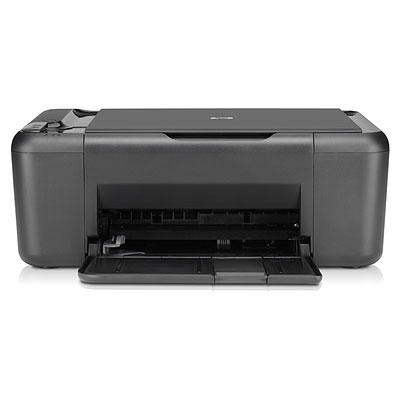
HP Deskjet F2480 Ink Cartridges
The following6 products are guaranteed to work in your HP Deskjet F2480 printer:
6 products
Sets of ink cartridges for HP Deskjet F2480 printer:

- 1x600pages
- 1x440pages
FREE next-day delivery when you order before 5:15pm
- Contains
CC641EE, CC644EE
FREE next-day delivery when you order before 5:15pm

- 1x200pages
- 1x165pages
FREE next-day delivery when you order before 5:15pm
- Lowest online price guarantee
FREE next-day delivery when you order before 5:15pm
Black ink cartridges for HP Deskjet F2480 printer:

- 1x600pages
Next-day delivery when you order before 5:15pm
Next-day delivery when you order before 5:15pm

- 1x200pages
Next-day delivery when you order before 5:15pm
- Lowest online price guarantee
Next-day delivery when you order before 5:15pm
Colour ink cartridges for HP Deskjet F2480 printer:

- 1x440pages
Next-day delivery when you order before 5:15pm
Next-day delivery when you order before 5:15pm

- 1x165pages
Next-day delivery when you order before 5:15pm
- Lowest online price guarantee
Next-day delivery when you order before 5:15pm
If you're looking for replacement ink for your HP Deskjet printer, it can be major headache, most notably when it involves being forced to shop around for a reasonable price. Nevertheless, shopping for your F2480 ink shouldn't be a stressful ordeal. Order your HP F2480 inkjet cartridges at Cartridge Save and you will not only save money compared to the high street, you'll also find deals better the other online retailers can provide
If you choose to place an order for cheap HP cartridges provided by Cartridge Save, you'll be able to relax knowing that this shipment shall get delivered on the very next day. Any HP F2480 inkjet supplies from Cartridge Save always are covered with a long money-back guarantee. When there are brilliant bargains such as these it's impossible not to save courtesy Cartridge Save.
What ink does the HP Deskjet F2480 use?
The HP Deskjet F2480 uses HP 300 ink cartridges. HP 300 ink comes in black; the black cartridge prints 200 pages.
HP Deskjet F2480 Printer Review
Expert review of the HP Deskjet F2480 printer
'%20/%3e%3cpath%20d='M%205.454545454545455,0.6060606060606061,1.8181818181818181,12.000000000000002,10.90909090909091,4.7272727272727275,0,4.7272727272727275,9.090909090909092,12.000000000000002z'%20fill='%23d8d8d8'%20transform='translate(24,0)'%20/%3e%3cpath%20d='M%205.454545454545455,0.6060606060606061,1.8181818181818181,12.000000000000002,10.90909090909091,4.7272727272727275,0,4.7272727272727275,9.090909090909092,12.000000000000002z'%20fill='%23d8d8d8'%20transform='translate(36,0)'%20/%3e%3cpath%20d='M%205.454545454545455,0.6060606060606061,1.8181818181818181,12.000000000000002,10.90909090909091,4.7272727272727275,0,4.7272727272727275,9.090909090909092,12.000000000000002z'%20fill='%23d8d8d8'%20transform='translate(48,0)'%20/%3e%3c/svg%3e)
'%20/%3e%3cpath%20d='M%205.454545454545455,0.6060606060606061,1.8181818181818181,12.000000000000002,10.90909090909091,4.7272727272727275,0,4.7272727272727275,9.090909090909092,12.000000000000002z'%20fill='%23edd400'%20transform='translate(24,0)'%20/%3e%3cpath%20d='M%205.454545454545455,0.6060606060606061,1.8181818181818181,12.000000000000002,10.90909090909091,4.7272727272727275,0,4.7272727272727275,9.090909090909092,12.000000000000002z'%20fill='%23edd400'%20transform='translate(36,0)'%20/%3e%3cpath%20d='M%205.454545454545455,0.6060606060606061,1.8181818181818181,12.000000000000002,10.90909090909091,4.7272727272727275,0,4.7272727272727275,9.090909090909092,12.000000000000002z'%20fill='%23edd400'%20transform='translate(48,0)'%20/%3e%3c/svg%3e)
Boasting a host of features including photocopier and scanner, the HP F2480 is a reliable all-in-one printer that won't break the bank. If you are looking for a no-frills, all-rounder then the F2480 is a good choice, print quality is reasonable and scanning and photocopying couldn't be easier. As a standalone device, the HP F2480 inkjet printer is fantastic value for money
Design
The HP F2480 will complement any home office, its matte-black finish and curved edges look fantastic and don't worry if you're stuck for room, the F2480 is compact in design so that you have more workspace free. The paper feed is at the rear of the printer and can hold 80 sheets; there is also a control panel on the top that allows you to copy documents without being connected to the computer. There are also three LED warning lights if the ink is low or there is a paper jam.
Advantages
Despite the HP F2480 inkjet printer being a budget all-in-one, the quality is fantastic. It can handle text and colour graphics with ease, colours are vibrant and text looks crisp and sharp. The scanner and copier, which has a 1200dpi resolution is nothing to write home about - but unless you are looking to scan or copy high resolution photos – it's more than adequate. The F2480 is also extremely energy efficient saving both the planet and your wallet.
Disadvantages
The main problem with the HP F2480 inkjet printer is its lack of connectivity. There is just one single USB slot at the rear of the printer which will cause problems if you are in a household with more than one PC or laptop. It's also missing a card reader which may put off those of you who like to print photographs or documents directly, without having to connect up to a computer. Another factor to consider is print speed, the F2480 is fairly slow compared to some of its rivals (7ppm for monochrome & 5ppm for colour) which isn't so much a problem if it's just used as a home printer, but if you are looking to print large documents regularly then consider something with a bit more oomph.