- Ink Cartridges
- HP Ink Cartridges
- Deskjet 2050 Ink Cartridges
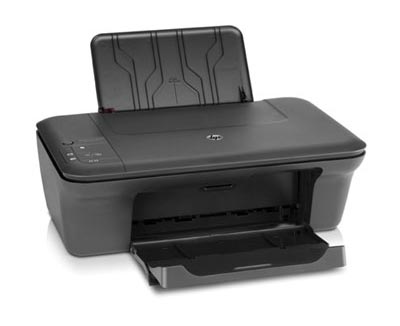
HP Deskjet 2050 Ink Cartridges
The following17 products are guaranteed to work in your HP Deskjet 2050 printer:
17 products
Sets of ink cartridges for HP Deskjet 2050 printer:

- 1x430pages
- 1x430pages
- 1x300pages
FREE delivery
Save £49.34 compared to HP
- Contains
CH563EE (x 2), CH564EE
FREE delivery
Save £49.34 compared to HP

- 1x430pages
- 1x300pages
FREE delivery
Save £33.55 compared to HP
- Contains
CC563EE, CH564EE
FREE delivery
Save £33.55 compared to HP

- 1x170pages
- 1x150pages
Shipped next working-day
Save £18.23 compared to HP
- Contains
CH561EE, CH562EE
Shipped next working-day
Save £18.23 compared to HP

- 1x430pages
- 1x430pages
- 1x300pages
FREE delivery
- Contains
CH563EE (x 2), CH564EE
- Lowest online price guarantee
FREE delivery

- 1x430pages
- 1x300pages
FREE delivery
- Contains
CH563EE, CH564EE
- Lowest online price guarantee
FREE delivery

- 1x170pages
- 1x170pages
- 1x150pages
FREE delivery
- Contains
CH561EE (x 2), CH564EE
- Lowest online price guarantee
FREE delivery

- 1x170pages
- 1x150pages
FREE delivery
- Contains
CH561EE, CH562EE
- Lowest online price guarantee
FREE delivery
Black ink cartridges for HP Deskjet 2050 printer:

- 1x430pages
Shipped next working-day
Save £18.17 compared to HP
Shipped next working-day
Save £18.17 compared to HP

- 1x170pages
Shipped next working-day
Save £7.01 compared to HP
Shipped next working-day
Save £7.01 compared to HP

- 2x430pages
FREE delivery
- Contains
CH563EE (x 2)
- Lowest online price guarantee
FREE delivery

- 1x430pages
FREE delivery
- Lowest online price guarantee
FREE delivery

- 1x170pages
Shipped next working-day
- Lowest online price guarantee
Shipped next working-day
Colour ink cartridges for HP Deskjet 2050 printer:

- 1x300pages
Shipped next working-day
Save £17.72 compared to HP
Shipped next working-day
Save £17.72 compared to HP

- 1x150pages
Shipped next working-day
Save £10.33 compared to HP
Shipped next working-day
Save £10.33 compared to HP

- 2x300pages
FREE delivery
- Contains
CH564EE (x 2)
- Lowest online price guarantee
FREE delivery

- 1x300pages
FREE delivery
- Lowest online price guarantee
FREE delivery

- 1x150pages
Shipped next working-day
- Lowest online price guarantee
Shipped next working-day
The 2050 is a terrific tool, but replacing printer ink cartridges may well cost you much more than expected. Actually finding matching print cartridges can also be a cumbersome bother, most notably if it entails needing to go to a number of stores. Suffice to say, getting your hands on 2050 cartridges need not have to be a difficult time. Get all of your HP 2050 inkjet cartridges now from Cartridge Save.
HP 2050 Printer Cartridges With Free Delivery on orders over £30!
Completely free overnight delivery on orders over £30 is offered as a part of the package with every purchase when you order cheap HP ink. HP 2050 inkjet cartridges from Cartridge Save always are covered by our money back refund policy. In case you have difficulties, just mail us your goods and get a full refund! Thanks to brilliant deals such as ours it's difficult to not spend less courtesy Cartridge Save.
What ink does the HP Deskjet 2050 use?
The HP Deskjet 2050 uses HP 301 ink cartridges. HP 301 ink comes in black; the black cartridge prints 170 pages.
HP Deskjet 2050 Printer Review
Expert review of the HP Deskjet 2050 printer
'%20/%3e%3cpath%20d='M%205.454545454545455,0.6060606060606061,1.8181818181818181,12.000000000000002,10.90909090909091,4.7272727272727275,0,4.7272727272727275,9.090909090909092,12.000000000000002z'%20fill='%23d8d8d8'%20transform='translate(24,0)'%20/%3e%3cpath%20d='M%205.454545454545455,0.6060606060606061,1.8181818181818181,12.000000000000002,10.90909090909091,4.7272727272727275,0,4.7272727272727275,9.090909090909092,12.000000000000002z'%20fill='%23d8d8d8'%20transform='translate(36,0)'%20/%3e%3cpath%20d='M%205.454545454545455,0.6060606060606061,1.8181818181818181,12.000000000000002,10.90909090909091,4.7272727272727275,0,4.7272727272727275,9.090909090909092,12.000000000000002z'%20fill='%23d8d8d8'%20transform='translate(48,0)'%20/%3e%3c/svg%3e)
'%20/%3e%3cpath%20d='M%205.454545454545455,0.6060606060606061,1.8181818181818181,12.000000000000002,10.90909090909091,4.7272727272727275,0,4.7272727272727275,9.090909090909092,12.000000000000002z'%20fill='%23edd400'%20transform='translate(24,0)'%20/%3e%3cpath%20d='M%205.454545454545455,0.6060606060606061,1.8181818181818181,12.000000000000002,10.90909090909091,4.7272727272727275,0,4.7272727272727275,9.090909090909092,12.000000000000002z'%20fill='%23edd400'%20transform='translate(36,0)'%20/%3e%3cpath%20d='M%205.454545454545455,0.6060606060606061,1.8181818181818181,12.000000000000002,10.90909090909091,4.7272727272727275,0,4.7272727272727275,9.090909090909092,12.000000000000002z'%20fill='%23edd400'%20transform='translate(48,0)'%20/%3e%3c/svg%3e)
HP designed the 2050 for home users that want a stylish, compact and affordable all-in-one printer. Installation is simple and the intuitive controls allow for fast and efficient printing, scanning and photocopying. The HP 2050 inkjet printer is built for everyday use, from printing texts document, scanning holiday snaps to simply photocopying receipts.
Design
The 2050 shares it looks with the rest of the Deskjet family with its compact design and matte-black finish. The paper input tray can only hold 60 sheets with the output tray coping with just 25 – not ideal if you are looking to print and collate large documents. The control panel can be found on the top of the printer, from here you can copy at the click of a button; you can also see how much HP 2050 ink is remaining and which HP 2050 cartridges need replacing. The HP 2050 has a single USB port at the rear for connection to your laptop or PC, you will also need to be running Windows XP or higher. The 2050 can also run on an Apple Mac.
Advantages
If you're looking for a quality printer without having to splash the cash then consider the HP 2050 printer. Plain text is crisp and sharp with no signs of fuzzing; colour graphics are rich and vibrant. The same can be said with the 1,200 dpi flatbed scanner which produces excellent reproductions with little to no fading. The copier is also impressive, creating accurate replicas at the click of a button. Photographic printing does let the inkjet printer down slightly, but was reasonable when you consider the HP 2050 is an entry-level printer.
Disadvantages
It's disappointing to see an all-in-one home printer that lacks wireless – especially when you consider the number of households with more than one computer or laptop. A simple memory card or USB slot for direct printing would have made the HP 2050 more versatile. Print speeds could also be improved (5.5 pages per minute for black) but as the 2050 isn't designed for the office, it's not crucial.