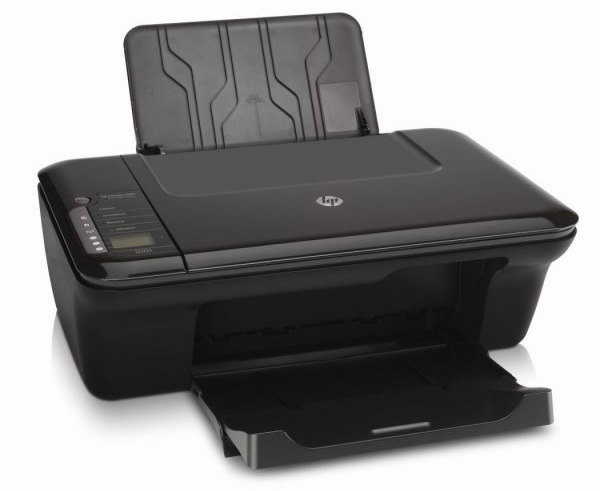
HP Deskjet 3050 ink cartridges 

HP Deskjet 3050 Ink Cartridges
(and other items)

The following 6 products are guaranteed to work in your HP Deskjet 3050 printer
See about our guarantee and FREE returns policy

Got a question about products for this printer?

Sets of ink cartridges for the HP Deskjet 3050 printer

Pack of 2 high capacity ink cartridges

  • Genuine HP 301XL
  • In Stock
  • Lowest price guaranteed

    Lowest price guaranteed

    If within 7 days of buying a product from us you find the same product cheaper elsewhere, we will refund you with 100% of the difference.

    For more information, click on the Low Price Guarantee link at the bottom of this page.

Black: 480 pages
Colour: 330 pages

4.1 pence per page
£33.48 (£40.18 inc VAT) FREE next-day delivery

Receive on Tuesday 29th May

Option 1: Free next-day
In 98% of cases, orders placed before 5pm Monday-Friday will arrive on the next working day. Uses Royal Mail 1st Class.

Option 2: Guaranteed next-day
The same as above, but uses priority courier. Costs £4.45 per order.

Add to basket

in your basket

Buy more and save
2-4 £32.08 (£38.50 inc VAT)
5+ £30.54 (£36.65 inc VAT)

Black ink cartridges for the HP Deskjet 3050 printer

High capacity black ink cartridge

  • Genuine HP 301XL
  • In Stock
  • Lowest price guaranteed

    Lowest price guaranteed

    If within 7 days of buying a product from us you find the same product cheaper elsewhere, we will refund you with 100% of the difference.

    For more information, click on the Low Price Guarantee link at the bottom of this page.

8ml

480 pages

3.8 pence per page
£18.08 (£21.69 inc VAT) FREE next-day delivery

Receive on Tuesday 29th May

Option 1: Free next-day
In 98% of cases, orders placed before 5pm Monday-Friday will arrive on the next working day. Uses Royal Mail 1st Class.

Option 2: Guaranteed next-day
The same as above, but uses priority courier. Costs £4.45 per order.

Add to basket

in your basket

Buy more and save
2-4 £16.74 (£20.09 inc VAT)
5+ £15.78 (£18.94 inc VAT)

Colour ink cartridges for the HP Deskjet 3050 printer

High capacity colour ink cartridge

  • Genuine HP 301XL
  • In Stock
  • Lowest price guaranteed

    Lowest price guaranteed

    If within 7 days of buying a product from us you find the same product cheaper elsewhere, we will refund you with 100% of the difference.

    For more information, click on the Low Price Guarantee link at the bottom of this page.

6ml

330 pages

5.5 pence per page
£18.08 (£21.69 inc VAT) FREE next-day delivery

Receive on Tuesday 29th May

Option 1: Free next-day
In 98% of cases, orders placed before 5pm Monday-Friday will arrive on the next working day. Uses Royal Mail 1st Class.

Option 2: Guaranteed next-day
The same as above, but uses priority courier. Costs £4.45 per order.

Add to basket

in your basket

Buy more and save
2-4 £16.74 (£20.09 inc VAT)
5+ £15.78 (£18.94 inc VAT)
proceed to checkout »

Have a question about products for this printer?

(20 questions : 20 answers)

Do you not supply Single 301 tricolour and Single 301 black cartrides for HP 1050 printer. I can only find twin packs in your list see 1 answer

Can this printer be used with Windows 7 Home Premium (x64) build 7600 How many ml does the HP 301 high capacity tri colour hold and How many ml does the HP 301 high capacity Black hold see 1 answer

  • According to HP's website, this printer should work with Windows 7, however I am unable to confirm this. For full information about the system requirements of this printer please see the section on Connectivity on HP's website below, http://h10010.www1.hp.com/wwpc/uk/en/ho/WF06b/18972-18972-238444-410635-410635-4066450-4125690.html.
    Unfortunately, HP do not provide the capacity of these cartridges in ml, but do advise that the HP 301XL black should achieve approximately 480 pages at 5% coverage and the HP 301XL colour should achieve about 330 pages at the 5% coverage.

    Answered by Vicky Lush (Staff Member) - 12 months ago

ink cartridges see 1 answer

could you tell me how many cartridges the printer needs, please? hp deskjet 3050.
  • Your printer requires two cartridges; a black and a colour. The cartridges your need, provided that the printer was purchased in the UK, are the HP 301 black or the high capacity 301XL, and the HP 301 colour or again the high capacity 301XL. To see the full list of cartridges we stock for your printer, please see the link below:
    http://www.cartridgesave.co.uk/ink-cartridges/HP/Deskjet-3050.html

    Answered by Vicky Lush (Staff Member) - 12 months ago

ink cardridges see 1 answer

are there any "recycled" cartridges at at less cost for my for my printer (3050) ? thank you
  • Unfortunately we currently do not sell compatible Cartridges for the HP Deskjet 3050 printer.

    Answered by Jessica Hoque (Staff Member) - 11 months ago

Can you please supply me in France? see 1 answer

I am english and would pay with my UK bank account.HSBC
  • We are currently only able to ship orders to locations within the UK and all items on our website are only compatible with printers purchased in the UK.

    Answered by Paul Miller (Staff Member) - 10 months ago

incompatible ink cartridges see 1 answer

My Hp printer Deskjet 3050 will not accept the HP 301 cartridges. Any suggestions? The message says they are incompatible. I just took out HP 61's that were out of ink.
  • The HP 301 cartridges are compatible with the HP Deskjet 3050, however they are only designed for use in printers purchased within the UK. Like DVDs, cartridges have region codes dependent on where the printer was purchased, for example a HP Deskjet 3050 purchased in America will require different cartridges to the same printer purchased in the UK.
    To be sure that you are ordering cartridges which will be compatible with your printer, you need to order a cartridge with the same number as the cartridges you have removed from the printer. Therefore, you will need to purchase a HP 61 cartridge.
    You may struggle to obtain non-UK cartridges in the UK, I would recommend doing a Google search for this cartridge number to find any companies that can supply it, or alternatively if you contact HP directly they should be able to help further. HP may even be able to help change the region of your printer. For information on how to contact HP, please see the link below to their website:
    http://www8.hp.com/uk/en/contact-hp/contact.html

    Answered by Vicky Lush (Staff Member) - 9 months ago

HP 300XL see 1 answer

What printers are these cartridges compatible with please?
  • HP 300XL ink cartridges are compatible with a wide range of HP printers provided that they were purchased in the UK. Please follow the link below to view a list of printers that use these cartridges:

    http://www.cartridgesave.co.uk/CC641EE.html

    NOTE - we can not guarantee that all printers that use these cartridges will be listed.

    Answered by Paul Miller (Staff Member) - 9 months ago

do the 301xl cartridges fit the 3050 wireless printer see 1 answer

It is confusing. Does the 301xl cartridge fit the 3050 wireless printer when I check for compatability the 2050 model is not on the list but advertised in you products
  • The HP Deskjet 3050 requires either the Black HP 301 or 301XL and the Colour HP 301 or 301XL cartridges. It takes the same cartridges as the HP Deskjet 2050.

    Answered by Vicky Lush (Staff Member) - 9 months ago

testing the quantity of printing ink cartridges see 1 answer

How do I check how much colour ink is left in my cartridges?
  • Unfortunately, we are unable to advise how to do this on each printer. However, they are normally two different ways of checking the ink level; when you print, there should be a display showing how much ink is left in each cartridge. Additionally, there is usually an option to check the ink levels in the maintenance options of your printer, there should be full instructions on how to do this in your printer manual. If you no longer have the manual for this printer, this can be downloaded from HP's website:
    http://h10025.www1.hp.com/ewfrf/wc/manualCategory?cc=uk&dlc=en&lang=en&lc=en&product=4066452&

    Answered by Vicky Lush (Staff Member) - 9 months ago

catriage compability see 1 answer

can hp 2050 use catriage no,61 pliz reply
  • The cartridge that you require for your printer is based on where the printer was purchased, this is because printers have region codes similar to DVDs. If the printer was purchased in the UK, you will require the HP 301 cartridges, which are UK cartridges. If your printer was purchased outside of the UK, you will need different cartridges. Unfortunately, I am unable to advise which cartridges you will need and would recommend contacting HP directly for further assistance. If you have been using the HP 61 cartridge previously in this printer then this will be the one that you need.

    Answered by Vicky Lush (Staff Member) - 9 months ago

Black Cartridge see 1 answer

I purchased a genuine black Cartridge from Asda on Saturday (301) it only did about 50 copies and was empty, so I bought another on Sunday and that did exactly the same. Please advise as I can't keep spending money in this way Thankyou Brenda
  • I am sorry to hear about the problems you have experienced with your cartridges. The HP 301 black cartridge is expected to achieve approximately 190 pages at a 5% coverage, this is about 3 or 4 lines of text on an A4 page. As soon as you are printing more than this, the number of pages you can expect to achieve will decrease. Depending on what you have been printing, it is possible that the cartridge has been used to full capacity.
    If you do a lot of printing, it might be worth investing in the higher capacity HP 301XL cartridge, HP advise that you should achieve over twice as many prints with this cartridge when compared to the standard HP 301 cartridge.

    Answered by Vicky Lush (Staff Member) - 9 months ago

ink cartridge see 1 answer

HOW DO YOU GET THE CARTRIDGE OUT AND IN THANK YOU
  • Unfortunately we are unable to advise on how to remove and install Cartridges.

    The Cartridges should come out of the printer quite easily.

    You may need to refer to your printer manual or contact HP directly.

    Answered by Jessica Hoque (Staff Member) - 8 months ago

fitting cartrdge see 1 answer

require how to fit new cartridge to hp desk top 3050 printeras i have misslaid my book
  • As we are only a supplier of consumable items for printers we are unable to provide this information. I have attached a link below to the HP website where you should be able to find this information:

    http://www8.hp.com/uk/en/contact-hp/contact.html

    Answered by Paul Miller (Staff Member) - 8 months ago

Cartridges 21 and 22 see 1 answer

Are these the correct ones for HP deskjet 3050 ?

cartridges see 1 answer

i have full 343 hp cartridge. my old printer is broken. can i use this in another new printer
  • I am very sorry to hear that your printer has broken. There are a number of different printers that can use this cartridge, please see the link below to our website for the full list, it is just below the cartridge and the yellow banner:

    http://www.cartridgesave.co.uk/C8766EE.html

    Answered by Vicky Lush (Staff Member) - 7 months ago

Colour /black ink cartridges see 1 answer

Can I use 300XL cartridges in HP DESKJET 4050A all in one J611 series?

black ink cartridges see 1 answer

I mostly black ink for letters do I have to fit both black and coloured cartridges.
  • Most printers will require both cartridges to be installed in order to function. Simply try removing the Colour cartridge and printing a page. Your printer will report an error if this is not possible.

    Answered by Paul Miller (Staff Member) - 7 months ago

photo copier? see 1 answer

does this printer (desk jet j611 series) make photo copies
  • According to the manual on the HP website this printer does have a scan and copy function, please see the link below to the manual for more information:

    http://h10032.www1.hp.com/ctg/Manual/c02853536.pdf

    Answered by Vicky Lush (Staff Member) - 4 months ago

ink cartridge numbers see 1 answer

I have an HP 3050 desk jet printer. It came with cartridge number 61 which I am unable to find. Will cartridge 301 (or some other) work equally well?
  • A '61' cartridge suggests that the printer is a non UK model. If this is the case, none of the cartridges we supply will be compatible with your machine.

    Answered by Daniel Zieba (Staff Member) - 3 months ago

HOW EASY? see 1 answer

Please advise on how to replace existing cartridge with a new one. I no longer have instructions following the purchase of my HP Deskjet 3050 scanner/printer last autumn. Thank you
  • Unfortunately, we cannot advise on how to replace the cartridges in this printer, but there are instructions on how to do this in your printer manual in the "How Do I?" section, please see the link below for more information:

    http://h10032.www1.hp.com/ctg/Manual/c02497809.pdf

    Answered by Vicky Lush (Staff Member) - 2 months ago
Ask a new question

Where do you look for the best range of HP 3050 ink in the British Isles? The best option is Cartridge Save, the country's top online store! Tracking down a printer's matching replacement ink cartridges is a time intensive problem, especially when it means needing to visit different merchants. Suffice to say, shopping for 3050 printer cartridges really doesn't have to have to be a taxing ordeal. Get all your HP 3050 inkjet cartridges now from Cartridge Save and you're going to save yourself much more than treasured time, you will also save cash!

Free Next Day Delivery With All HP 3050 Ink

Totally free next day delivery comes as one part of the deal with each order if you purchase cheap HP ink cartridges here with Cartridge Save. HP 3050 ink cartridges bought online with Cartridge Save always are protected with our 30 day long cash-back pledge. Shop now - get a better price.

Most popular HP printers

HP Deskjet 3050 Printer Review

Expert review of the HP Deskjet 3050 printer 03 May, 2012

Our Verdict:  

HP Deskjet 3050 ink cartridges 

The DeskJet 3050 printer is part of HP’s entry level, all-in-one range. It scans, copies and prints and can be connected wirelessly making this printer suitable for households with more than one computer. Designed with speed in mind, the HP 3050 inkjet printer is perfect for anyone in a hurry.


Design

The styling is very similar to its younger sibling, the DeskJet 1050, with its high-gloss finish and curved edges, the only major difference is the maroon stripe across the centre. If you want a printer that has a relatively small foot print then the DeskJet 3050 is ideal), the paper trays can also be flipped in to save even more space. Another great feature of the 3050 is the LCD panel which allows you to turn the wireless on and off, scan documents, make copies, print quick forms and even order new ink supplies, all at the touch of a button.

Advantages

Wireless network capabilities make the HP 3050 preferable over the 1050 base model. Print speeds are also impressive (20 pages per minute for black and 16 pages per minute colour) making this printer perfect for large or frequent print jobs . The 3050 is also accredited by ‘Energy Star’ for its low power consumption which will not only save you money on your energy bills but is environmentally friendly too. Thanks to their considerate design, replacing the HP 3050 cartridges won't take long.

Disadvantages

Although performance is great when it comes to speed, the same can’t be said for print quality. Normal print mode is disappointing, plain text blurred in areas and coloured graphics suffered from fading. The copier fared slightly better producing a print copy that was reasonably close to the original. Despite quality issues, the HP DeskJet 3050 is great value for money and is perfect for everyday home use.