- Ink Cartridges
- HP Ink Cartridges
- Photosmart 425 Ink Cartridges
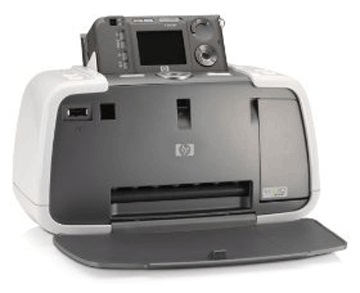
HP Photosmart 425 Ink Cartridges
This product1 products is guaranteed to work in your HP Photosmart 425 printer:
1 product
Colour ink cartridges for HP Photosmart 425 printer:
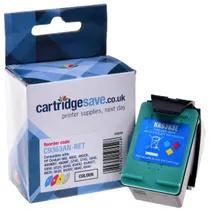
- 1x560pages
FREE delivery
FREE delivery
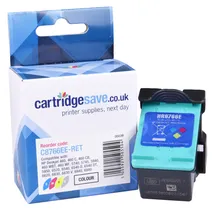
- 1x330pages
Out of stock
Available to buy from 13/11/2026
Out of stock
Available to buy from 13/11/2026
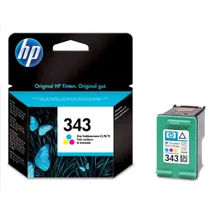
- 1x330pages
Out of stock
- Lowest online price guarantee
Out of stock
What ink does the HP Photosmart 425 use?
The HP Photosmart 425 uses Cartridge Save 344 ink cartridges. Cartridge Save 344 ink comes in tri-colour; the tri-colour cartridge prints 560 pages.
HP Photosmart 425 Printer Review
Expert review of the HP Photosmart 425 printer
'%20/%3e%3cpath%20d='M%205.454545454545455,0.6060606060606061,1.8181818181818181,12.000000000000002,10.90909090909091,4.7272727272727275,0,4.7272727272727275,9.090909090909092,12.000000000000002z'%20fill='%23d8d8d8'%20transform='translate(24,0)'%20/%3e%3cpath%20d='M%205.454545454545455,0.6060606060606061,1.8181818181818181,12.000000000000002,10.90909090909091,4.7272727272727275,0,4.7272727272727275,9.090909090909092,12.000000000000002z'%20fill='%23d8d8d8'%20transform='translate(36,0)'%20/%3e%3cpath%20d='M%205.454545454545455,0.6060606060606061,1.8181818181818181,12.000000000000002,10.90909090909091,4.7272727272727275,0,4.7272727272727275,9.090909090909092,12.000000000000002z'%20fill='%23d8d8d8'%20transform='translate(48,0)'%20/%3e%3c/svg%3e)
'%20/%3e%3cpath%20d='M%205.454545454545455,0.6060606060606061,1.8181818181818181,12.000000000000002,10.90909090909091,4.7272727272727275,0,4.7272727272727275,9.090909090909092,12.000000000000002z'%20fill='%23edd400'%20transform='translate(24,0)'%20/%3e%3cpath%20d='M%205.454545454545455,0.6060606060606061,1.8181818181818181,12.000000000000002,10.90909090909091,4.7272727272727275,0,4.7272727272727275,9.090909090909092,12.000000000000002z'%20fill='%23edd400'%20transform='translate(36,0)'%20/%3e%3cpath%20d='M%205.454545454545455,0.6060606060606061,1.8181818181818181,12.000000000000002,10.90909090909091,4.7272727272727275,0,4.7272727272727275,9.090909090909092,12.000000000000002z'%20fill='%23edd400'%20transform='translate(48,0)'%20/%3e%3c/svg%3e)
Those looking for a compact and portable printer that comes with a no-fuss and user-friendly digital camera will appreciate the HP Photosmart 425, which is often bundled with a 5.2-megapixel digital camera. However, some users say that the accompanying digital camera is inferior and limits the printer's compatibility with other devices.
Design
The HP Photosmart 425 is integrated with thermal inkjet technology. The paper feed and output tray can only handle up to 26 sheets of 4x6- or 4x7-inch prints. There is a card reader for MMC and SD Cards, and additional connectivity options include PictBridge, Bluetooth, and high-speed USB 2.0. Colour prints can be optimised to 4800x1200 dpi. Compact and portable, the HP Photosmart 425 is 2.8 pounds and is 8.9 inches in diameter, 6.4 inches tall, and 9.3 inches wide.
Advantages
The variety of connectivity options helps users increase their productivity. With the HP Photosmart 425, they can directly print from a memory card and HP digital camera. Printing high-quality photos on 4x6-inch photo paper takes less than a minute, making the HP Photosmart 425 among the fastest. It supports borderless printing. The ink dries almost instantly after printing, making photos less prone to smudging.
Disadvantages
The HP Photosmart 425 is not the most versatile printer around. It does not have an LCD screen; you will need to settle the accompanying digital camera on the dock if you want to review the pictures before printing them. The output tends to be grainy, too, mostly because of the HP camera's poor auto focus. You will nee to buy black ink separately because the printer only comes with standard colour ink.