- Ink Cartridges
- HP Ink Cartridges
- Officejet Pro L7555 Ink Cartridges
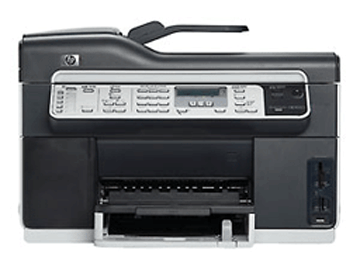
HP Officejet Pro L7555 Ink Cartridges
The following5 products are guaranteed to work in your HP Officejet Pro L7555 printer:
5 products
Sets of ink cartridges for HP Officejet Pro L7555 printer:
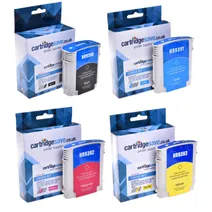
- 1x2580pages
- 1x1840pages
- 1x2190pages
- 1x1650pages
FREE next-day delivery when you order before 5:15pm
- Contains
C9396AE, C9391AE, C9392AE, C9393AE
FREE next-day delivery when you order before 5:15pm
Black ink cartridges for HP Officejet Pro L7555 printer:
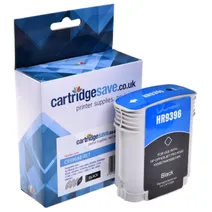
- 1x2450pages
Next-day delivery when you order before 5:15pm
Next-day delivery when you order before 5:15pm
Cyan ink cartridges for HP Officejet Pro L7555 printer:
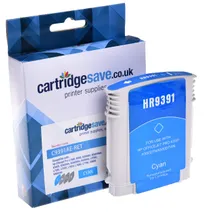
- 1x1840pages
Next-day delivery when you order before 5:15pm
Next-day delivery when you order before 5:15pm
Magenta ink cartridges for HP Officejet Pro L7555 printer:
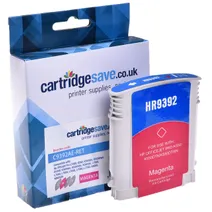
- 1x1980pages
Next-day delivery when you order before 5:15pm
Next-day delivery when you order before 5:15pm
Yellow ink cartridges for HP Officejet Pro L7555 printer:
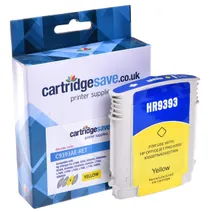
- 1x1650pages
Next-day delivery when you order before 5:15pm
Next-day delivery when you order before 5:15pm
What ink does the HP Officejet Pro L7555 use?
The HP Officejet Pro L7555 uses Cartridge Save 88XL ink cartridges. Cartridge Save 88XL ink comes in cyan; the cyan cartridge prints 1,840 pages.
HP Officejet Pro L7555 Printer Review
Expert review of the HP Officejet Pro L7555 printer
'%20/%3e%3cpath%20d='M%205.454545454545455,0.6060606060606061,1.8181818181818181,12.000000000000002,10.90909090909091,4.7272727272727275,0,4.7272727272727275,9.090909090909092,12.000000000000002z'%20fill='%23d8d8d8'%20transform='translate(24,0)'%20/%3e%3cpath%20d='M%205.454545454545455,0.6060606060606061,1.8181818181818181,12.000000000000002,10.90909090909091,4.7272727272727275,0,4.7272727272727275,9.090909090909092,12.000000000000002z'%20fill='%23d8d8d8'%20transform='translate(36,0)'%20/%3e%3cpath%20d='M%205.454545454545455,0.6060606060606061,1.8181818181818181,12.000000000000002,10.90909090909091,4.7272727272727275,0,4.7272727272727275,9.090909090909092,12.000000000000002z'%20fill='%23d8d8d8'%20transform='translate(48,0)'%20/%3e%3c/svg%3e)
'%20/%3e%3cpath%20d='M%205.454545454545455,0.6060606060606061,1.8181818181818181,12.000000000000002,10.90909090909091,4.7272727272727275,0,4.7272727272727275,9.090909090909092,12.000000000000002z'%20fill='%23edd400'%20transform='translate(24,0)'%20/%3e%3cpath%20d='M%205.454545454545455,0.6060606060606061,1.8181818181818181,12.000000000000002,10.90909090909091,4.7272727272727275,0,4.7272727272727275,9.090909090909092,12.000000000000002z'%20fill='%23edd400'%20transform='translate(36,0)'%20/%3e%3cpath%20d='M%205.454545454545455,0.6060606060606061,1.8181818181818181,12.000000000000002,10.90909090909091,4.7272727272727275,0,4.7272727272727275,9.090909090909092,12.000000000000002z'%20fill='%23edd400'%20transform='translate(48,0)'%20/%3e%3c/svg%3e)
Offices in need of an entry-level multifunction printer may opt for the HP Officejet Pro L7555 all-in-one. This complete unit offers an inkjet printer, copier, scanner, and colour fax machine. The HP Officejet Pro L7555 multifunction printer is network-ready and also offers memory card readers. It has a monthly duty cycle of 7,500 pages and offers a maximum resolution of 600 x 1,200 dpi. Optional Bluetooth adaptor is available for wireless printing. The HP Officejet Pro L7555 MFP does not come with Wi-Fi.
Design
Measuring 212.5 x 496 x 403.2 mm and weighing 9.7 kg, the HP L7555 Officejet Pro colour printer is easy to place in offices. It has a 250-sheet multipurpose tray, 350-sheet tray, and a 50, sheet automatic document feeder. Card slots are on the lower right of the HP L7555 inkjet printer beside the output tray. There is a control panel with function buttons, numeric keypad, and LCD display along with the ADF and flatbed scanner. For connectivity, Ethernet and USB ports are provided.
Advantages
Paper waste can be reduced as the HP Officejet Pro L7555 all-in-one inkjet printer comes with an automatic duplexer for double-sided printing. This reliable unit delivers good quality prints, faxes, scans, and copies plus it offers memory card slots for convenience. Sharing the Officejet Pro L7555 printer is easy, thanks to the built-in Ethernet and its compatibility to Macintosh and Windows computers. Third party manufacturers specialise in producing recycled HP Officejet Pro L7555 cartridges which contain non-HP ink and act as a cheaper alternative to the genuine HP supplies.
Disadvantages
This printer can be more convenient with the addition of a coloured LCD display. The HP Officejet Pro L-7555 does not offer Wi-Fi nor optional paper trays.